
A buyer's guide to choosing a web designer for your business
So, you need a website for your business? Great! But, how do you choose which web designer or agency is right for your needs? A quick Google search will reveal heaps of businesses offering web design in Sydney (my hometown) alone, with the same true of the local area where you are. How will you know which one will be the right choice?

The first step to choosing a web designer is to get clued up on what you should expect from web design and how your website can be leveraged to help deliver on your business goals. That way, you can make an informed decision. I can assure you that out of the hundreds of websites I’ve built, the most successful projects were the ones where my clients were informed and understood the role of their website as the key representative of their business (often online and off).
Now, I’m not saying you need to know how to code the thing yourself. Website tech can be confusing, and that’s what you have a web designer like me for. However, there are a number of key things you should understand to ensure you get a great result.
Let’s review the key aspects to consider so that you can get the great website you’re looking for,
I know you’ll have many questions about web design, and I aim to answer them all. Maybe I’ll even answer a few you didn’t know you had yet. Let’s jump in…
Nailing your website strategy
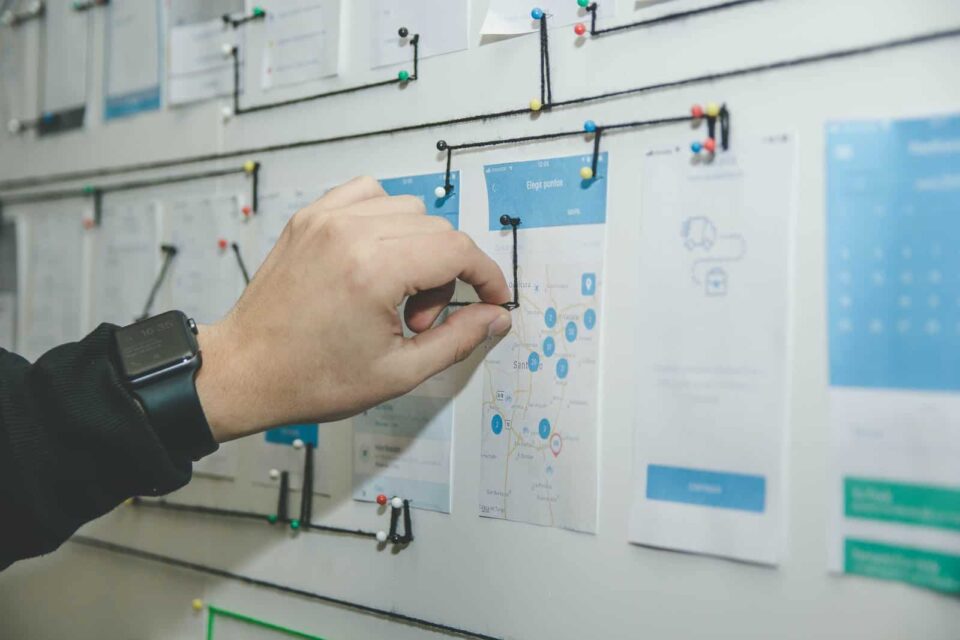 Before any pretty images or clever content hit those web pages, you must do some strategy work. Without getting the foundations right, you can’t ever hope to create a successful end product. After all, would you build a house without a plan from an architect? Didn’t think so!
Here are some of the strategic considerations you need to make:
Understand your ideal client
Your website should be like a giant blinking neon sign drawing in the kind of clients you love to work with, like a bee to honey! It should engage them and show them that you are the business they need in their lives. To do that, you need to be clear on exactly who your ideal client is.
Everything on your website should speak to those people you can help the most. Obviously, you can’t make your website speak to your ideal client unless you understand exactly who they are. Knowing this is the first step to a successful web design journey.
Define your unique value proposition
What makes you stand out from the others in your industry? There will be something uniquely ‘you’ that sets your business apart and draws potential clients in. Once you define your Unique Value Proposition, everything else in your web design package will flow from there.
It’s important to remember that your website is not about you. I know, I know—it’s your website. But, your website is there to serve your audience, so it needs to resonate with them. A great way to ensure that it connects with them is to explore their needs, wants, and fears.
This will help you understand the unique reason your clients are seeking you out. Once you define this reason, you can weave it throughout your website in the language you use, how you talk about your services, and even the images you select to embody your brand.
Define your user journeys
People have a very short attention span when browsing online. If they can’t immediately find the information they need or if navigating a website becomes too difficult, they will click the back button and move on to the next provider.
Defining clear user journeys will prevent that from happening. Having that definition means your website content and structure can reflect the journey potential leads will take with your business so that their experience on your site is effective and easy.
Leads will come to your website because they have a problem that needs to be solved, and they hope you can solve it. There is usually more than one way that they will find you. So, consider all the possibilities — will they come from a lead magnet, your social pages, a cold Google search or a word-of-mouth referral?
Then, consider the journey you want them to take from the moment they discover your business, to hopefully becoming a paying client or customer. Your website should make it easy for them to navigate that entire journey.
Establish your key services or offers
While this might seem obvious, it can sometimes be difficult for business owners to articulate their core services. Ideally, you want to define around three key services so that it is very clear what you offer. You don’t want to overwhelm people when they land on your website.
When defining these services, think about your three main offerings, not all the upsells you offer to repeat clients. Anything that falls outside of your most common services for new clients should be moved to your back pocket for now. They can be woven into your service ladder in new ways. Then, consider how you can categorise your services in a way that will meet your clients’ needs or solve an immediate problem for them. You might categorise by the specific service, different levels of the same service, or by client type if you are addressing different audiences with the same product — whatever makes the most sense for your business.
Will you productize your services?
A productized service is a service that has been packaged into a product.
How do you work out if you can productize your current services? Well, most service providers offer 1:1 advice, strategy, mentoring or training. If you break those services down into the areas of change that your clients need to tackle, then some of the components can be packaged up and sold as a product — examples include things like retirement planning or dispute resolution.
A productized service has a specific expected outcome and usually a timeframe, too. It can often be delivered on an ongoing basis (perhaps even by subscription) to keep clients engaged with your business and represent consistent value. Offering your services in a productized way can increase your efficiency and reduce your costs, so it’s worth considering.
Check out more info about productizing your services here.
Sign up to the Box Clever newsletter
Straight-up advice to help you work smarter, not harder (+ subscriber-only discounts) — direct to your inbox.
How will you update your website?
You want to make the process of maintaining your website easy. So, if you or someone on your team are going to be making the updates, you’ll want a good CMS (Content Management System) setup.
What’s a CMS?
Put simply, a CMS is the software that helps you to create, manage and modify the content on your website without the need for specialist coding. Common CMS options include WordPress, Shopify, Webflow, Wix and Squarespace.
They all have different benefits, so it’s worth chatting to your web designer about which will suit your needs best. The decision will depend on what you want the website to be able to do, how comfortable you are with technology, and what your long-term business growth goals are.
There’s a lot of lingo to learn when it comes to web design, check out our Plain English guide to website terminology for other terms that might seem mysterious.
Do you want to leverage automation technology for site updates?
Whether you have a team that can update your website for you, or you’re the one wearing all the hats in your business, letting tech do the heavy lifting can go a long way to creating capacity in your day. Taking advantage of automation technology and a well-built and designed user interface also takes the risk out of website updates. If everything is templated and streamlined, you can’t accidentally break the site or mess up the design.
Here’s an example of how I build out site management functionality for my clients.
Most business owners hate WordPress. It’s a confusing mess in the back-end, that makes site updates unnecessarily difficult. For that reason, I usually recommend Squarespace for early-stage businesses. But Squarespace also has its issues, as you need to touch the design to make content changes. That risks your brand integrity at every turn.
For my WordPress clients, I build a custom dashboard in every site I build. It’s based on a template I made, so building it out is quick, but it makes the world of difference to my clients, because when they log in to edit their site, they don’t see a confusing WordPress admin interface. They see the dashboard I made for them.
Here’s the simple dashboard I made for Future IM/Pact:

From this dashboard, clients can update the main aspects of their website.
Now imagine being able to edit your website simply by filling in a form…
For many clients, I also build custom forms that allow them to update their website content by filling in a simple form. The forms I create are custom to the specific needs of each client and their content, but here’s an example from a client in California, who runs a yoga and holistic wellness studio:

This format makes it a simple fill-in-the-gaps exercise for time-poor business owners and staff to quickly add the content to the website, and know that they have included everything they need to include in a way that is automatically consistent with every other event they’ve ever published on the site. No messing with the website design. No double-checking that everything is included. No referring to a style guide. It’s all built in to make site updates a breeze.
When the form is submitted, a new Event post is created with its own URL, booking form, and thank you page all automatically connected. Because I’ve already told the website what to do with this sort of content, and what needs to be included on the published page, it all just happens ‘automagically’.

Not only does the event have its own web page, but it is also automatically added to an event section on the website home page and featured as an upcoming event on the Events page.
I also build out pages that allow my clients to easily edit their existing content from an intuitive page that actually looks like their content, instead of an unfamiliar software interface.

Editing any of these events is as simple as changing the details via a form that’s auto-populated with the existing event content. Click ‘Update’ and the event is updated online. Again, no messing with the design, no chance of accidentally forgetting an important detail, your brand integrity is maintained, all business owners and their teams are given intuitive prompts that make the process of site updates really easy.
For scaling businesses, this process is a huge win. It means you can bring on staff to help with marketing without requiring that marketing employee to also be an expert at web design — a skills mix that many say they can do but most can’t do well unless they are truly experts commanding an appropriately high salary. In short, this system allows you to scale faster and more controlably, without risking your brand becoming fragmented. Huge win.
What else can be automated?
Now, the thing I also add for many of my clients is social media campaign setup. So when the event, as in the example above, is published, my social scheduling tool recognizes a new post and automatically creates a promotional campaign for me using the assets in the article. I simply confirm the campaign and it auto-posts to the social channels of my choice for as many posts as are needed. Very, very cool.
In short, there’s a lot of manual work that can be taken off your desk and systematized using technology. These sort of enhancements make it far easier for small businesses to scale and grow than ever before.
What other technology can you use?
We already talked about making your website easy to navigate so it doesn’t become an obstacle for your potential clients. However, there are plenty of other technology solutions that can be added to further improve their customer experience.
Think things like appointment scheduling tools, email marketing software to nurture leads, email automation for onboarding and structured client communication, document signing tools, and simple e-commerce solutions that integrate with your accounting software so you can easily accept online payments.
You can even take it one step further by offering a member-only area to share key resources, client documents or membership material.
The tech used for your business will vary depending on the admin hours you are trying to save by taking advantage of these technologies, and if your client journey is well mapped out, how this can easily be scaled up as your business grows.
For more on tech solutions, see our article, Cost-effective marketing automation—the real cost of HubSpot.
Website traffic
You can’t sell a secret! So, if website traffic is important for bringing more clients into your business, then you will need to make sure your site is optimized for SEO (search engine optimization).
Now, you don’t just want to rank for any old search terms! You want to make sure that your SEO is targeted and in line with the audience you want to attract. It’s also not a one-and-done kind of thing. You will need to have an ongoing SEO plan and process for managing its effectiveness.
Web design packages: what should you pay?
 Web design packages range in price depending on how simple or complex you need the site to be. Obviously, a simple ‘online business card’ style website with no integrations is going to be much less of an initial investment than a more intensive website with multiple services and contact pages.
You can expect the following approximate rates:
- Simple one-page site with no integrations: AUD$1000–$2000 (we’ll sometimes do these as a rapid-build in a Clever Day; they aren’t great for SEO, but they give you that quick online presence to generate trust)
- A small site to include less than 10–30 pages with simple (but still clever) customisations: between $5000 and $20,000 depending on the number of web pages and level of customisation needed
- Complex, larger site with multiple integrations or complex eCommerce needs: upwards of $20,000, depending on the number of web pages and level of customisation needed.
For more details on what you can expect to pay, read our accompanying article, How much should web design cost?
A web designer should be able to give you an indication of the cost of their web design packages once they understand the parameters of your proposed website. For more info on how our services work, check out our web design packages.
How to choose a web designer
 Alright, you are fully informed about the key aspects of web design packages. Now it’s time to choose a web designer! But, how do you know which is the right one for you?
Here are some things to consider:
- Watch out for ‘gurus’! If someone promises you something that sounds too good to be true, it probably is! There is no silver bullet that will make your website an instant success the moment you receive it from your web designer! You want to embrace organic growth to maintain your integrity and credibility.
- Location. Do you want to be able to meet your web designer in person, or are you happy to connect with them via video call and email? If you are a Sydney local and are hoping to work with a specialist who understands business where you are, then you’ll want to select a Sydney-based web designer (like me!). If you can’t find the right fit locally, you camn look for designers in culturally similar locations. Hence, we do a lot of work for clients in the US, particularly on the West Coast, where the timezone is working for us. Luckily, technology allows us to do everything remotely, so if you are not based in Sydney, you can still choose to work with us. We are also lucky to flex our web design skills and business knowledge by working with consultants around the world.
- Experience. Does your web designer have the experience you need? Consider which industries they have worked with and the kind of sites they have previously created. Alignment here is more important than you might think, as same-sector experience demonstrates previous experience with clients like yours and a deeper knowledge of your target market. This reduces the learning curve as your designer gets to know your business — and they should get to know you so well that they can speak as though they sit at the desk beside you every day.
- Partnerships. Can your web designer provide you with access to other services through established partnerships and a solid referral network? An example of this is the Studio Clvr partnership with Lawpath (among others), which provides our clients with online legal documents, making it simpler and faster to get a new business off the ground.
- Scalability. Invest in solid foundations you can build on. Our small business web design packages are ready for strategic and flexible future growth—without reinventing the wheel when you’re ready to scale.
- Testimonials. Before you select a web designer, check out what other people are saying about working with them. Don’t just look at the testimonials they put on their website, but read Google and Facebook reviews. A simple internet search should turn up any concerning testimonials.
- Vibe. You want to know that you can work well with your web designer. A good designer will take the time to understand you and will help you to make the right decision for your business. A great way to check their vibe is to sign up for their newsletter; that way, you can get to know them better and see if they are on the same wavelength as you.
Ready to nail your web design strategy?
 Ready to get the ball rolling on your new website? Well, the first thing you will need is to nail that all-important strategy. Without that, your scope is often vague, and I’ve seen so many businesses come undone by other designers who have promised the world but have not done the strategy work, so they don’t fully understand the tech stack or the integrations required. This lack of preparation gets messy fast during a web build when both the client and the designer are deep in the build phase and only just working out a major piece of the puzzle is missing, kinda like when you’re building an IKEA chest of drawers and realise at step 11 that you skipped step 2. A lot of the website help work I do is coming to the rescue for people working their way out of this exact dilemma.
Simplify the complex and gain a detailed framework to implement on a new or existing site with our Website Strategy Workshop. The one-off strategy fee is deductible from our web design packages or can be taken to your existing web developer for implementation. Meet with one of our expert team to create a strategic plan for your website. Together, we’ll outline the architecture, core messaging, systems, and integrations.
Get a fully deductible website strategy workshop
Free if you go on to hire us, or a ready to go brief for you to use with another designer.

Hey, I’m Nic. I’m a digital design strategist on a mission to make your clever stand out. Because the world is better when we’re clever, together.
Like what you’re reading? Sign up to the Box Clever newsletter for fortnightly clever business tips, musings and related website wondery.


