
Web design jargon explained in plain English
If you’re like most professionals, you don’t have time to become a website expert—you want to hire one! But understanding the basics can go a long way to helping you make the most of your website design. This plain English guide will help you decipher website terminology, so you can communicate with your web designer and make informed decisions about your website project.

It’s worth learning the lingo
As a business owner, getting to grips with the basics of web design and development can make a world of difference for your online presence. Understanding key website terms helps you communicate more effectively with your web designer, make informed decisions, and ensure your site is working hard for your business. Whether you’re launching a new website or updating an existing one, knowing the language of web design means you can confidently discuss your needs, set clear goals, and avoid common pitfalls. This guide breaks down essential terms in simple terms, so you can focus on growing your business with a website that’s designed to support your goals.
Aa
Above the fold
This is an old publishing term used to describe content that would be visible when a newspaper was folded. The most important information is always presented ‘above the fold’ to capture the reader’s attention. The same notion holds true in web design, where you ideally want a web visitor to understand who you are, how you can help them and what action they can take to make that happen, all in the visible screen area they first see before needing to scroll.
Accessibility
How accessible is your site to people with disabilities? This is one aspect of web design that is often overlooked. Not only is getting accessibility right good for your customers, but it’s also good for Google, as it will likely help more people find you in a search.
Bb
Back end
The admin area of your website that a site visitor can’t see, but that your site ‘admins’ can see. The back end houses the theme or template used to form the structure of your site, any plugins or integrations needed to help run your site, and the CMS where you can edit your site posts, pages and media files.
Backlinks
Links on other websites that link back to your website. Having backlinks is a great way to spread the word about your existence and boost your search rank in Google’s eyes. However, not all links are created equal, so beware of anyone who tells you to buy backlinks as they’ll increase your domain’s spam score and will make you look dodgy as all get out. Sites with a high spam score are not pushed forward by Google in search results, so this sort of tactic can backfire big time.
Bounce rate
The percentage of website visitors who leave your site without clicking through to another page. A high bounce rate often indicates poor information architecture (users struggle to find what they’re looking for), low-quality content (users find the content unhelpful or unauthoritative), or poor user experience (friction on the page frustrates users). Bounce rate isn’t the huge concern it used to be from a Google perspective (Google say it doesn’t affect your domain authority), but time on site does affect your domain authority, so keeping visitors on your website for longer does matter.
Browser cache
The temporary storage of website files on a visitor’s device makes your site load faster on repeat visits. Sometimes visitors need to ‘clear their cache’ to see website updates you’ve made.
Cc
Cache
The temporary storage of website files in your browser/website builder/speed plugin/host server to make your site load faster on repeat visits. Sometimes you’ll need to ‘clear the cache’ in a whole bunch of places to see website updates you’ve made.
 Call to Action (CTA)
In web design, a call to action (CTA) is a key element that prompts users to take a specific action, helping you achieve your business goals. Effective CTAs are clear, direct, and easy to find, using action words like “Get Started” or “Subscribe.”
This is a direct request to your site visitors to do something. Web data shows that people are lazy and like to be told what to do. If a user has made the big step of getting to your site in the first place, make it easy for them to take the next step by prompting them to take action.
Content
Take it literally — content is literally everything inside your website. Content is text. Content is images. Content is videos. Content is audio recordings. Just as the content of a glass jar might be jellybeans, the content of your website is all the things you want to put in it.
Content management system (CMS)
Using a content management system (CMS) like WordPress or Squarespace makes it easy to update your website content without needing technical skills.
This is the control centre for your website. It’s where you add pages, write blog posts, add images, update your site plugins, theme or template and control the other users (administrators, editors, contributors, subscribers) who you have allowed access to your website. The are many CMSs out there, with some of the most popular being WordPress, Squarespace, Wix, and Webflow, among others.
The CMS that’s right for you will depend on your business goals and where you’re at in your business journey. For businesses starting out, I usually recommend Squarespace. For businesses ready to scale, WordPress is a great option for helping you take advantage of repeatable systems and automations to make it easier to manage your website over the long term.
Conversion rate
The percentage of website visitors who complete a desired action (like filling out a contact form or making a purchase). It’s a key metric for measuring how well your website is achieving your business goals.
Cookies
Small files stored on a visitor’s device that remember their preferences and activity on your site. These help create a better user experience, but also require those cookie consent notices you see everywhere.
Copy
The text on your site.
Copywriter
A professional writer, often hired to provide expert help with website copy (text). A good website copywriter will understand how to structure your text to benefit search engines, as well as how to craft compelling messaging that persuades website visitors to take action. We include copywriting (in varying degrees) in all Studio Clvr websites to ensure your content is doing everything possible to amplify your clever.
Dd
DNS
DNS stands for Domain Name System. For your website to open when someone types in https://yourdomainname.com, your DNS settings need to point to the website. This is done by adding some records to your DNS settings.
DNS can be confusing, which is why we connect your domain to your website for you at setup. It’s worth knowing what DNS is, though, in case you need to make changes down the track (i.e. adding a .com.au domain to also point to your .com). DNS will come up in the course of connecting all sorts of tools to your website and to your domain name (i.e., email, CRMs), so even even you don’t want to be the one fiddling with it, understanding what it is can help you know what needs to be done and where to go for help doing it. If you’re reading this as a Studio Clvr client, we’ve got you.
Domain authority
A score that predicts how well your website will rank in search results. Higher authority comes from quality content, backlinks, and good SEO practices over time.
Ee
e-Commerce
Literally electronic commerce. If you sell anything on your site, be it a physical product, a digital download, or a service, you need to connect your site to a payment gateway in order to process sales. Common payment gateways include PayPal and Stripe.
Ff
Favicon

The icon used to represent your brand in the browser address bar. Favicons also appear next to the website title in the browser tab, helping users identify and distinguish between multiple open tabs, which enhances usability and reinforces your branding.
Footer

The bottom section of your website that appears on every page typically contains a blurb about your business, contact details, links to important pages, and legal information like privacy policies.
Front end
The ‘face’ of your website — the website as the general public sees it when typing your website URL into their internet browser.
Gg
Google Analytics
Google Analytics is a free tool that gives you a behind-the-scenes look at how users interact with your website. It tracks important data like which pages visitors view, how long they stay, where they come from, and what actions they take. By reviewing this information, you can see what’s working well and where your site might need improvement. Google Analytics helps you understand your visitors’ experience, so you can make changes that keep users engaged and encourage them to take the next step—whether that’s filling out a form, making a purchase, or reading more content.
Hh
Hosting
There are two types of hosting: domain hosting and web hosting, and it’s easy to get them confused when all of this is new.
Domain hosting is where your domain name (literally your website address) lives. A web address is the full clickable address (URL) users type into their browser to access a website (i.e. https://studioclvr.com.au), while the domain name is the memorable part of that address (studioclvr.com.au). So, for studioclvr.com.au, the domain lives on iwantmyname.com.
Web hosting is where your website lives. This is a bigger deal as you want your website to be on a reliable, fast and secure server to ensure great site stability. The Studio Clvr website is currently hosted on Wordify.
Some hosts offer the option to purchase both the domain name and website hosting directly from them, allowing everything to be in one place, but most people prefer to keep them separate, and there are some very sensible don’t-keep-all-your-eggs-in-on-basket reasons why this is a good idea.
Header

The header is the top section of your website that visitors see on every page. It usually includes your logo, the main navigation menu, and often your contact information. A well-designed header makes it easy for visitors to find their way around your site, access important pages, and get in touch with you. Keeping your header clear and uncluttered helps users quickly locate the information they need, making for a smoother, more user-friendly experience.
Homepage
Your homepage is the digital front door to your business—the first thing most visitors see when they land on your website. It should instantly communicate who you are, what you offer, and why someone should stick around. A strong homepage includes a clear value proposition and a prominent call to action (CTA), such as “Contact Us,” “View Services,” or “Book an Appointment,” guiding visitors to take the next step.
Ii
Icons
Icons are the little graphics that visually represent what you are trying to say. They are commonly used online to break up text with visual elements. Depending on how they are used, they can be quirky, professional or something in between.
The Elementor Pro page builder that your site is built on includes a large range of icons for you to choose from, or you can upload your own.
Index page
A page that lists out (indexes) information in sections so that they appear on a single page. For example, if a website has only a few services or very thin content on the individual services pages, it may provide a better user experience for site visitors for all of the services to appear as different sections of the same page so that visitors aren’t frustrated by having to click to different pages that don’t have much content.
Index pages aren’t great for SEO, so we don’t recommend them, but they are commonly used on older Squarespace 7.0 sites, but not in Squarespace 7.1 or in Studio Clvr Wordpress setups.
Information architecture
The structure of your website, think of this like the framework of your house. It’s what holds everything together. Just like your house, if your architecture isn’t taken care of, those shoddy foundations will come back to bite you!
Ll
Landing page
A standalone page designed for a specific marketing campaign or call-to-action. Unlike your homepage, landing pages have one focused goal—like getting someone to download your guide or book a consultation. A landing page usually won’t have a site header or footer; it’ll have a single focus of trying to convert a visitor to take the action requested — i.e. to buy a service.
Load time
How quickly your website appears when someone visits. Slow load times frustrate visitors and hurt your Google ranking, so keeping your site speedy is crucial for business success.
Mm
Meta description
The short description that appears under your page titles in Google search results. Think of it as your elevator pitch to potential visitors; it should be compelling enough to make them want to click through to your site.
Nn
Navigation
The structure by which a visitor navigates through your site. A search bar is often included in the navigation area or header to help visitors quickly find content on the site. This is commonly referred to as your site menus, which often include ‘top navigation’ in the site header, ‘footer navigation’ in the site footer, and ‘not linked navigation’ for pages linked within your website content but not visible from a menu.
Pp
Plugin
Add-on software that extends your website’s functionality. Like apps on your phone, plugins let you add features like contact forms, social media feeds, or online booking systems without custom coding.
Rr
Resolution
The sharpness of images on your site. Your images should have a pixel height and width equal to the pixel dimensions they take up on the screen. If an image is enlarged across an area bigger than the pixel dimensions of the image, it will appear ‘pixelated’ and blurry.
 Responsive design
 Responsive design
To make sure your website works well for everyone, it’s important to use responsive design—so your website looks great and functions smoothly on all screen sizes, from mobiles to desktops.
Does your site layout automatically respond and adapt to different screen sizes? With Google favouring mobile-first in search engine results, it is crucial for websites to either have device-specific layouts or responsive layouts that adapt to different screen sizes. If a website looks cut off when viewed on a mobile device, it is not responsive. All Studio Clvr websites are responsive and optimised for mobile.
Ss
Search Engine Optimization (SEO)
The process of maximizing your ability to appear in a Google search. If you want to be found in search, optimizing your site for Google is a must. By following SEO best practices, you help your website appear higher in search engine results, making it easier for new clients to find you.
Search rank (or page rank)
Where you appear in search results. Most people want their website to rank on the first page of Google. This doesn’t happen by magic; sites are optimized to increase their visibility to search engines. Also see SEO.
Site map
Literally a ‘map’ of your site. Your site map shows how each page of your site connects to every other page. It will look like any other flow chart used for your business — your staff org chart, for example. Most web builders/CMSs (WordPress, Squarespace, Wix) automatically generate a site map for you. Google needs your site map to understand how to read your website and how all of your content fits together.
A site map is essential for optimizing a website’s structure and content, making it easier for search engines to understand and rank the website.
Getting your web designer to manually submit your site map to Google will speed up the indexing process (until your site has been indexed, search engines won’t be able to see it), which is why we manually get all Studio Clvr websites indexed on both Google and Bing at go-live.
 Style guide
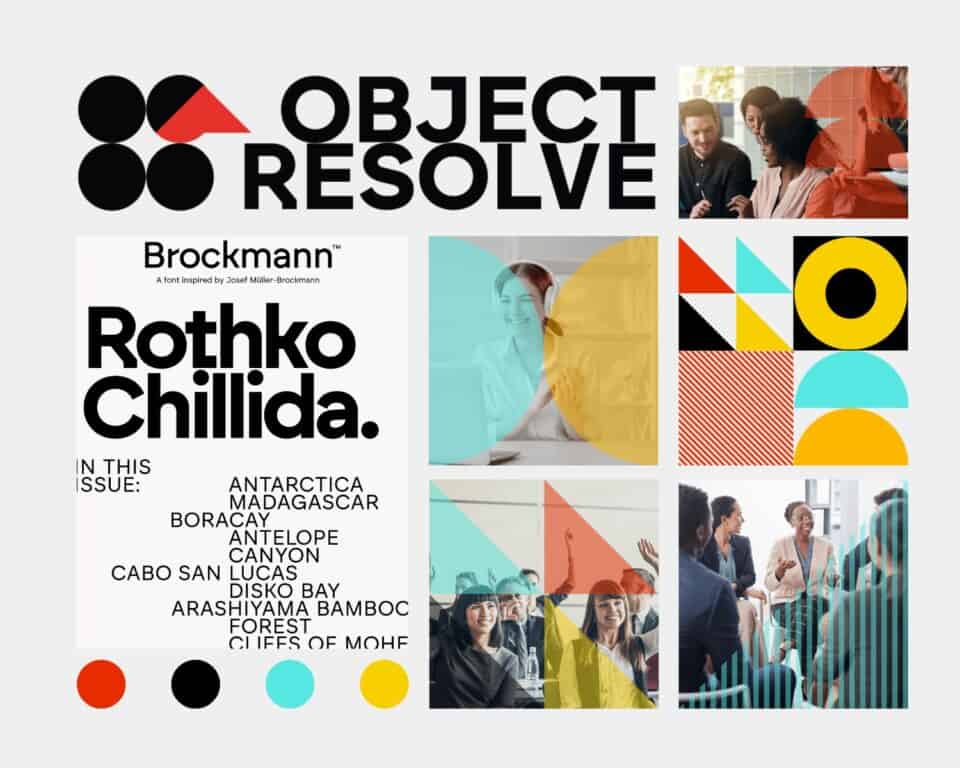 Style guide
You may have heard it before — a logo is not a brand. Your brand is the culmination of your logo, typography, colour palette and graphic styles. A style guide or brand guide is the ‘bible’ for your brand, outlining exactly how, when and where specific brand elements should be used to ensure that your brand is applied consistently everywhere it is used. Businesses without a style guide often wonder why their business isn’t resonating with their customers. While there can be many reasons for this problem, a strong contender is often that the brand isn’t strong enough for a user to connect to it. Having a style guide helps to shore up all of your brand decisions to keep your brand consistent and more recognisable.
Tt
Thin content
Pages without much text. Google doesn’t like pages with ‘thin content’. But sometimes you just don’t have much to say, and it’s definitely better to keep a page short and easy to understand than to waffle on with no substance just to add more words for the sake of it. Just think about how a user will experience this content — will they be annoyed at having clicked through to a page with hardly anything on it? Or will they be glad the page is straight to the point? What function does the page serve to a site visitor? Do you want this page to appear in search results? Google likes good, long content, so writing in-depth, quality, authoritative content will help you rank, but it depends on the purpose of the page in question and not every page on your site needs to appear in search results.
Typography
The fonts used on your website and the hierarchy and styles used by those fonts. This is actually super important beyond the obvious design impact of your fonts. A correct typography setup helps both users and search engines understand your website. Poorly set up or implemented typography systems can have a detrimental impact on user experience and search engine optimization.
Uu
Unsplash
Unsplash is a free stock image library that we sometimes integrate into websites for clients who find it difficult or time-consuming to source images. You can add an image directly from inside your website without having to first download it from an image library and then upload it to your site. Better yet, the alt description and photographer details are automatically populated for you, so you are copyright secure and Google-friendly all in one easy swoop.
User
A human visitor on your website.
User experience
The experience a user has when visiting your website — is your site intuitive and easy to navigate? Can they easily find what they are looking for? A good user experience keeps visitors on your site for longer. This not only makes it more likely that they will take action on your site, but a good user experience also increases your search rank.
User interface
The user interface refers to the visual and interactive elements of the website that users interact with to navigate and control the site.
Ww
Web standards
A website should meet a set of industry-recognised standards to perform well, be professional, and meet other criteria such as security and accessibility. Truth talk: because anyone can dabble with Wix and call themselves a web designer, there are, unfortunately, a lot of practitioners out there who don’t know what web standards are or how to meet them. You want a website that works well and can grow with you, so be sure to ask about web standards as part of your hiring process (check out our article, A buyer’s guide to choosing a web designer for your business).
Widgets
A widget is like a mini unit of functionality that sits within the larger application that is your website. A single widget has to interact with other widgets on your site to work, but in and of itself, it has a very specific function. Just about everything you see on your website is an individual widget, collectively they combine to form your site.
Widgets are often used to add specific features and functionality to websites, enhancing user experience and site capabilities.
Widget examples:
- Text Editor
- Image
- Video
- Form
- Reviews
- Facebook Embed
- Share Buttons
There are loads and loads of WordPress add-ons that you can access. However, not all of these will work well with your site, so check with your designer if there’s something specific you are trying to achieve, and we can advise on the most stable option for your setup.
Understanding website terminology does help
Understanding these web design terms and concepts means you can work more effectively with your web designer, ensuring your website is designed to meet your business needs and deliver a great user experience for every visitor.
Looking for a web designer who knows what they're talking about?
As an expert in your own right, investing in a web designer who knows their onions is crucial to impactful ROI.

Hey, I’m Nic. I’m a digital design strategist on a mission to make your clever stand out. Because the world is better when we’re clever, together.
Like what you’re reading? Sign up to the Box Clever newsletter for fortnightly clever business tips, musings and related website wondery.


